


AVG Antivirus offers robust security for various devices, ensuring protection for PCs, laptops, and mobile phones. If you have a multi-device subscription, follow this step-by-step guide to install AVG on all your devices efficiently.
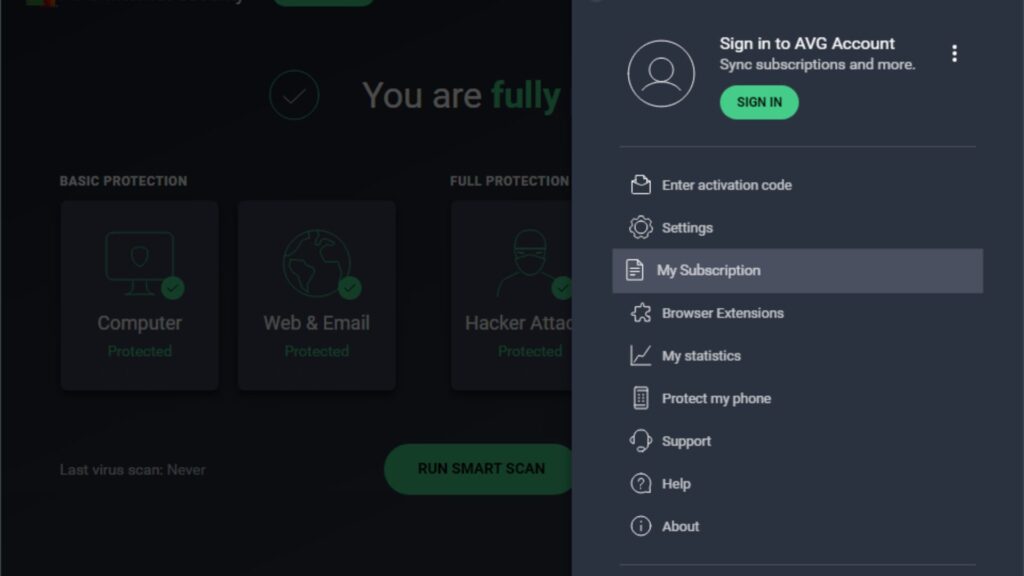
Check Your AVG Subscription
Before installing AVG on multiple devices, confirm that your subscription plan supports multi-device use.
- Log into AVG My Account and go to My Subscriptions.
- Check if your plan includes multiple device installations.
- If necessary, upgrade to a multi-device subscription.
Download and Install AVG on Your Main Device
Start by installing AVG on your primary device.
For Windows & Mac:
- Visit the AVG Download Page and choose the product.
- Download and run the installer.
- Follow the on-screen instructions to complete the installation.
- Sign in using your AVG account to activate your subscription.
For Android & iOS:
- Open the Google Play Store or Apple App Store.
- Search for AVG Antivirus and install the app.
- Open the app and log in to activate your subscription.
Install AVG on Additional Devices
Once AVG is installed on your main device, you can install it on other devices using one of these methods:
Option 1: Install via AVG Account
- Open a web browser on the second device.
- Go to AVG My Account and log in.
- Click Install on Another Device and follow the instructions.
Option 2: Send an Installation Link
- Open AVG on your primary device.
- Navigate to Menu > My Subscription > Install on Another Device.
- Enter an email address and send the installation link.
- Open the email on the second device and install AVG.
Activate AVG on Each Device
After installation, activate AVG on each device:
- Open AVG Antivirus.
- Click Menu > My Subscription.
- Enter the activation code or log in with your AVG account.
- The device is now protected under your subscription.
Configure Security Settings on All Devices
To maximize protection, configure security settings for each device:
✔ Enable Real-Time Protection to block threats instantly. ✔ Set Automatic Updates for up-to-date virus definitions. ✔ Schedule Regular Scans to detect and remove threats.
Manage Devices from AVG Account
You can track and manage all connected devices from your AVG account:
- Log in to AVG My Account.
- View all devices under My Subscriptions.
- Remove or add new devices as needed.
Conclusion
Installing AVG on multiple devices is simple and efficient. Follow these steps to ensure complete protection for all your devices. Regular updates and security checks will help maintain strong protection against online threats.


